
File-Level Visibility in Splunk. Finally.
FileSure sends kernel-level file access events directly to your Splunk instance — every user, every file, every process, allowed or blocked. Pre-built dashboard included. Free to download.
You Can See Network Traffic and Logins in Splunk. But Which Files Is That User Actually Opening?
Windows Event Log file auditing is notoriously noisy, incomplete, and painful to configure. Most security teams either turn it off entirely or drown in useless events that don't tell them what they actually need to know.
What's missing from your Splunk data right now:
- Which specific files a user opened, copied, renamed, or deleted
- Which application performed each operation — not just which user
- Whether a suspicious process was actually blocked or just detected
- File-level activity on legacy Windows systems that won't run modern EDR agents
- The difference between what Windows allowed and what your security policy allowed
FileSure fills that gap. It operates at the Windows kernel level, intercepts every file operation before it completes, and sends structured, CIM-mapped events directly to Splunk via UDP syslog — no middleware, no cloud relay, no additional agents.
Pre-Built Dashboard. CIM-Mapped Fields. Data Within Minutes.
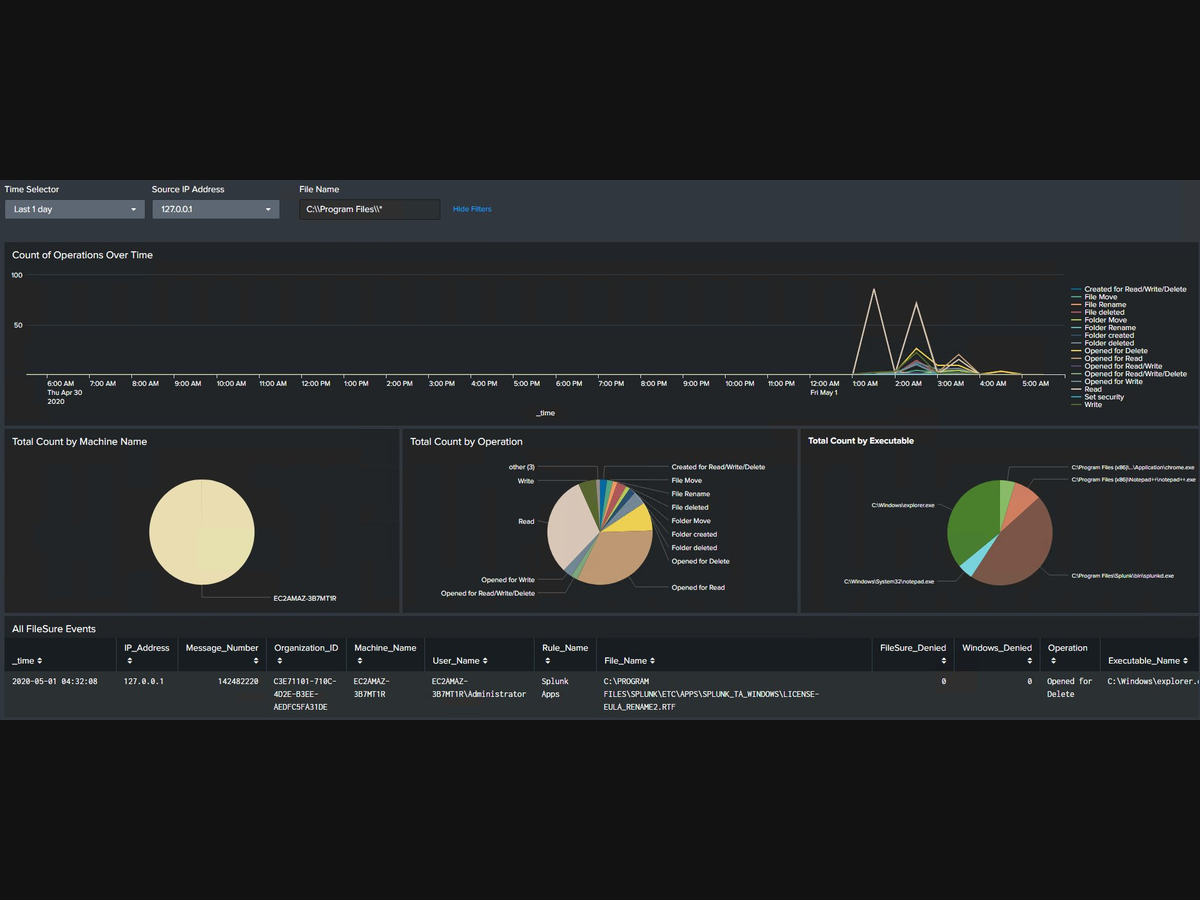
FileSure Dashboard in Splunk — file operations over time, breakdown by machine, operation type, and executable, plus raw events table with full field extraction. Click to enlarge.
What the dashboard shows:
- File operations over time — line chart broken out by operation type
- Breakdown by machine name — see which endpoints are most active
- Breakdown by operation type — reads, writes, deletes, renames at a glance
- Breakdown by executable — which programs are touching your files
- Raw events table — every event with all extracted fields
- Filters — time selector, source IP, file name search
Every Event Includes Everything You Need to Investigate
| Splunk Field | What It Contains |
|---|---|
User_Name |
Domain\Username of who touched the file |
File_Name |
Full path of the file |
Operation |
Read, Write, Delete, Rename, etc. |
Machine_Name |
Hostname of the endpoint |
Executable_Name |
Full path of the process (e.g. C:\Windows\explorer.exe) |
FileSure_Denied |
1 if FileSure blocked it, 0 if allowed |
Windows_Denied |
1 if Windows blocked it, 0 if allowed |
Rule_Name |
Which FileSure policy rule matched |
Drive_Type |
Fixed Drive, Removable, Network, etc. |
Rename_To |
New filename if operation was a rename |
IP_Address |
Source IP of the monitored machine |
Sample raw syslog event:
May 1 04:32:08 127.0.0.1 BYS142482220:{C3E71101-710C-4D2E-B3EE-AEDFC5FA31DE}:EC2AMAZ-3B7MT1R:EC2AMAZ-3B7MT1R\Administrator:Splunk Apps | C:\PROGRAM FILES\SPLUNK\ETC\APPS\LICENSE-EULA.RTF | 0 | 0 | Opened for Delete | C:\Windows\explorer.exe | Fixed Drive | 1 |Full SPL Query Access — Search and Correlate Like Any Other Data Source
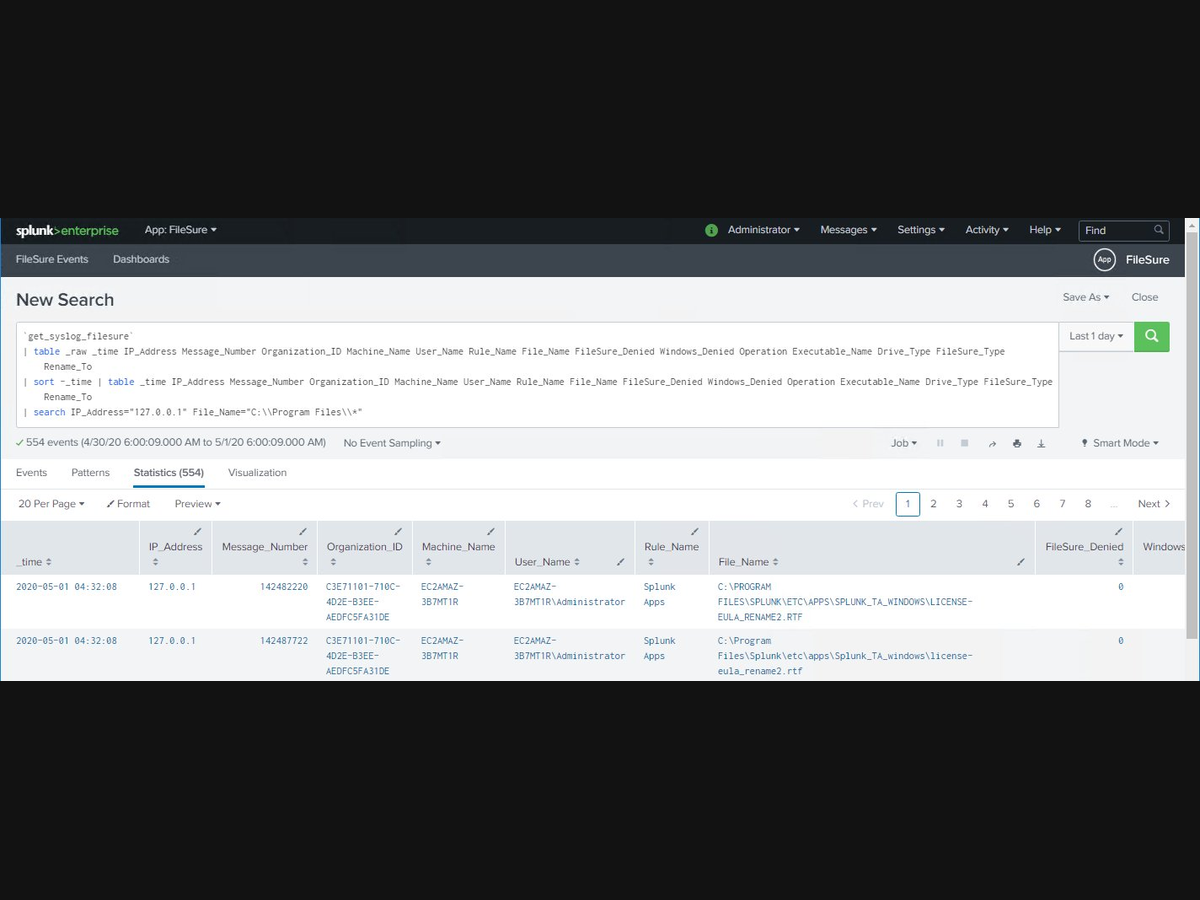
FileSure events in Splunk search — use SPL to correlate file activity with network logs, AD events, and vulnerability data in a single query. Click to enlarge.
Detect ransomware precursor behavior
Search for any user reading or copying more than 500 files in an hour. FileSure events give you the file count, the user, the machine, and whether FileSure blocked any of the operations.
Investigate insider threat incidents
When HR flags an employee, pull their complete file activity history in seconds — every file they opened, copied, or deleted, with exact timestamps and which application they used.
Compliance audit reporting
Show auditors exactly which users accessed PHI, financial records, or classified files during a specific period — with proof of which operations FileSure blocked.
Two App Folders. One UDP Port. Data in 15 Minutes.
What installs on the Splunk server (filesure/)
- sourcetype definition (
props.conf) - Custom index (
indexes.conf) - Search macro (
macros.conf) - Pre-built dashboard
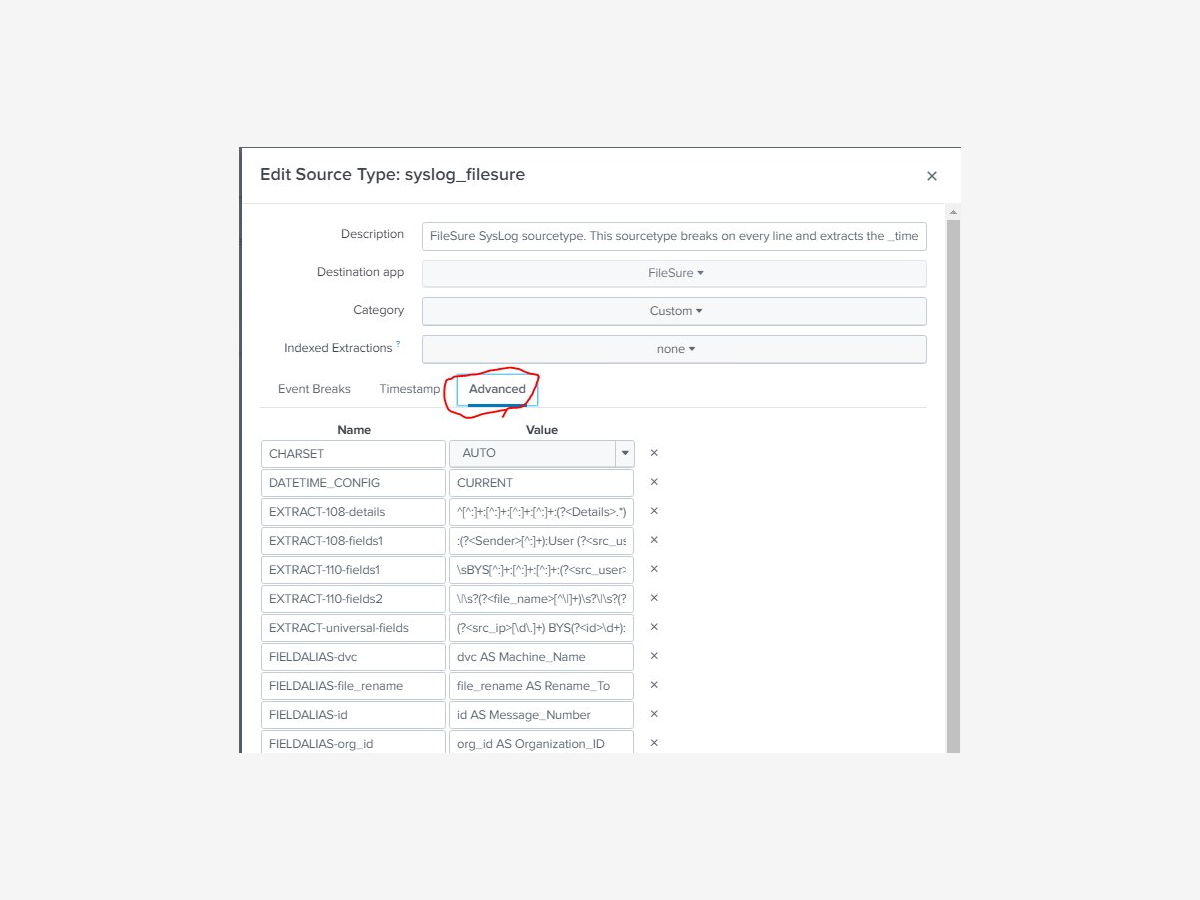 View source type config
What installs on FileSure endpoints (filesure_uf/)
- Configures Splunk to listen for UDP syslog on port 514
- Routes events to the syslog index with sourcetype
syslog_filesure
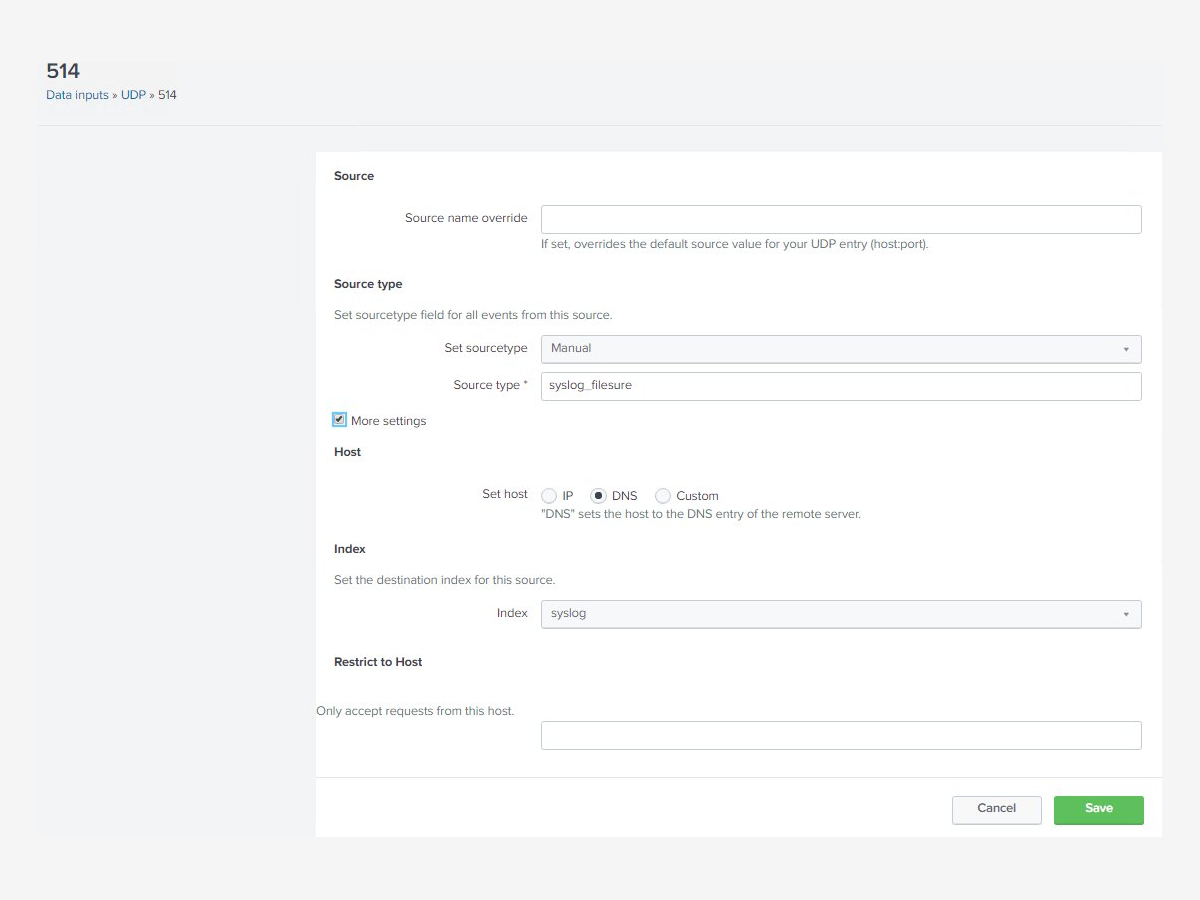 View UDP input config
Setup steps:
- Download the ZIP from the link below
- Copy
filesure/folder to$SPLUNK_HOME\etc\appson your Splunk server - Copy
filesure_uf/folder to$SPLUNK_HOME\etc\appson each server running FileSure - Restart the Splunk Windows Service
- Confirm FileSure is writing to syslog on UDP 514
- Navigate to Apps → FileSure in Splunk — events appear within seconds
Prerequisites:
- Splunk Enterprise (any recent version)
- FileSure Defend installed and licensed on Windows endpoints
- Network path open between FileSure endpoints and Splunk server on UDP 514
Every Field Extracted. No Custom Parsing Required.
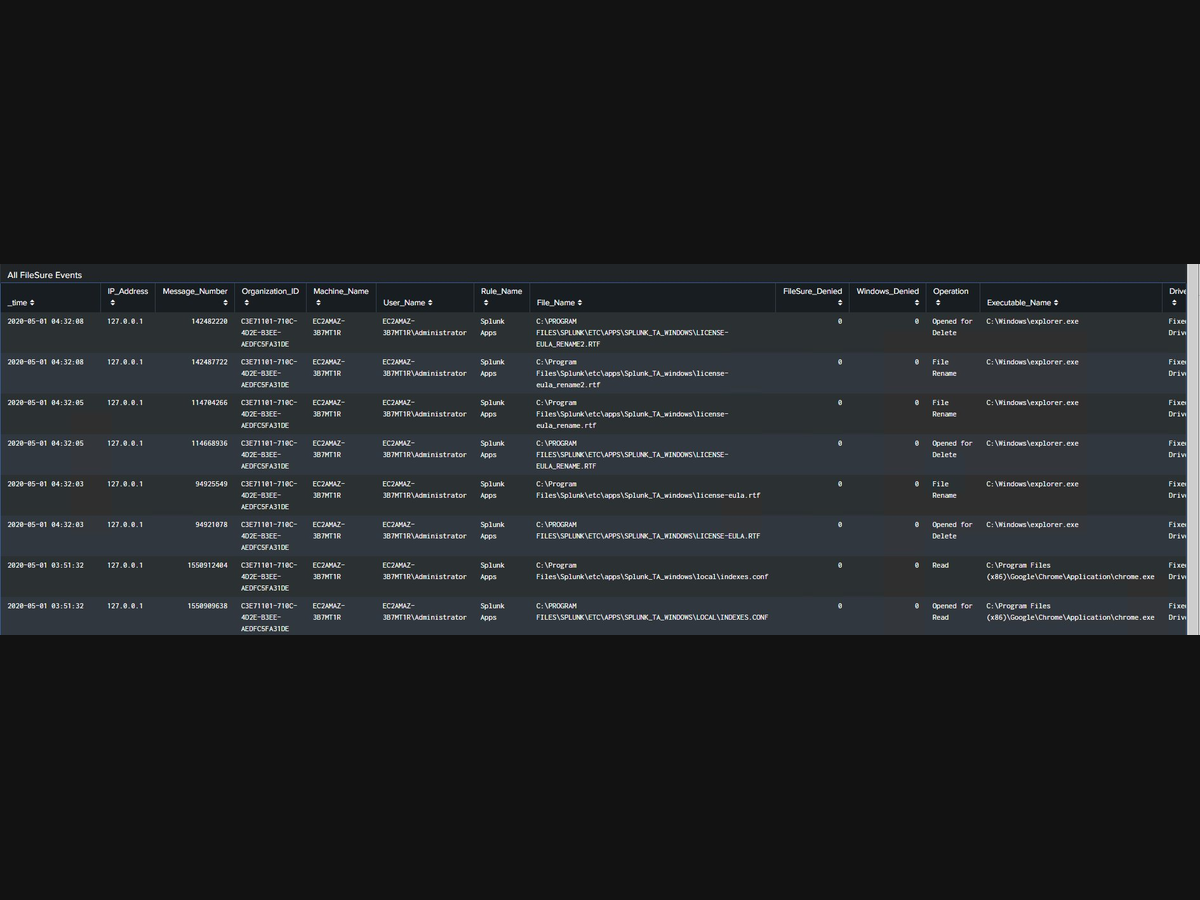
The raw events table shows every extracted field — user, file, process, operation, and whether FileSure or Windows blocked it. CIM-mapped fields work with existing Splunk correlation searches out of the box. Click to enlarge.
Built for Security Teams That Need File-Level Answers
National Security
"A U.S. national security facility uses FileSure with Splunk to maintain continuous file integrity monitoring across air-gapped Windows systems — including legacy endpoints that cannot run modern EDR agents."
Regulated Industries
"Organizations subject to HIPAA, PCI DSS, FISMA, and SOX use FileSure's Splunk integration to produce audit-ready reports showing exactly which users accessed sensitive files — and which operations FileSure blocked."
Enterprise Security Operations
"Security teams that couldn't get useful file-level data out of Windows native auditing now correlate FileSure events with their existing Splunk alerts to investigate insider threat incidents and ransomware precursor behavior."
Why Not Just Use Windows Event Log Auditing?
| Windows Native Auditing | FileSure + Splunk | |
|---|---|---|
| Performance impact | High — can crash systems | <2% CPU |
| Legacy Windows support | Limited | All versions |
| Pre-operation intercept | No | Yes |
| Blocks unauthorized operations | No | Yes |
| CIM-mapped Splunk fields | No — requires custom parsing | Yes — included |
| Setup complexity | High | Low — file copy only |
| Event noise | Extremely high | Focused and relevant |
The Splunk Integration Is Free
- FileSure Splunk Add-on: Free download, no license required
- FileSure Defend: Required — $65/workstation/year, $1,250/server/year
The add-on is an extension of FileSure Defend, not a standalone product.
Add File-Level Visibility to Splunk Today
Free download. FileSure Defend license required.
21-day free trial, no credit card required.
Integration questions welcome.